
Ns design blog
How to Make an ID Card with AI (Step by Step)
You can make a professional ID card with AI in about five minutes. You describe what the card is for, the assistant shows three finished designs, you pick one, add your logo and photo, and order. You do not need design skills. This guide shows each step on the NS Design card designer.
- Price: from £4.99 per card (reverse side +£1.00, NFC +£2.50, QR code free)
- Card: 85.6 x 54 mm PVC, the standard ID card size
- Minimum order: none. One card or a whole team
- Delivery: printed in the UK, free UK delivery over £30
- Free: design as much as you like and download your cards as a PDF before you order
Before you start
Have these ready, though you can add them later: your organisation name, the people who need cards (name and job title), a logo if you have one, and a photo of each person. A clear, front-facing head and shoulders photo works best. Phone photos are fine.
Step 1: Choose the AI assistant
Open the card designer. At the top you are asked how you want to make your cards. Choose Let the AI assistant do it. If you prefer to do it yourself, choose I’ll design it myself instead. You can switch at any time and your work carries over.

Step 2: Describe your cards
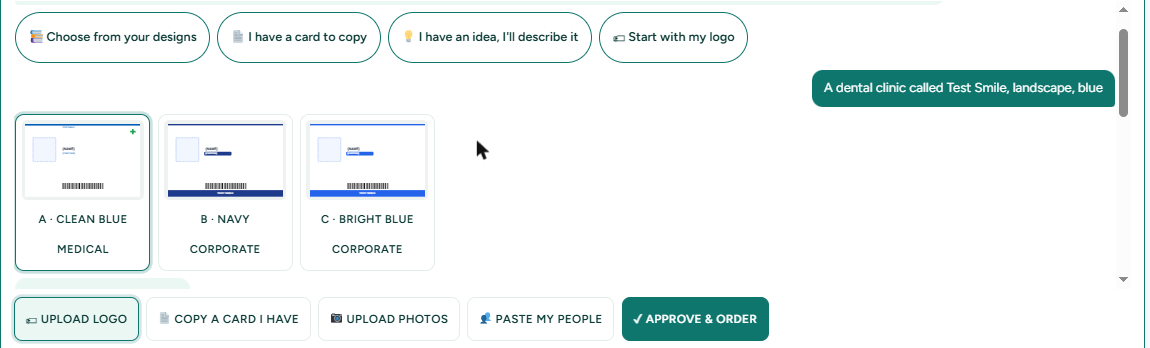
Type a short description in plain English. For example: A dental clinic called Test Smile, landscape, blue. The assistant asks the few questions it needs, such as portrait or landscape, one side or two, and whether you have a logo. Answer in a few words, or tap the answer buttons it shows.
Step 3: Pick one of three designs
The assistant draws three finished options on your own card, labelled A, B and C. Option A is applied straight away. Tap B or C to swap. This is faster than scrolling through hundreds of templates.
Step 4: Add your logo and people
Tap Upload logo and choose your file. No logo? Ask the assistant to make a simple monogram with your initials. It can draw badges and wordmarks. It cannot draw illustrated logos, so for those use your own file.
Then add your people. Type them in, or tap Paste my people and paste names and job titles straight from a spreadsheet. For larger teams, upload a CSV file. Add one photo per person.
Step 5: Fine-tune with your finger or mouse
The card appears inside the chat. Tap any element, such as the photo, name or logo, then drag it. Pinch on a phone, or use the A- and A+ buttons, to make it smaller or bigger. You can also just ask: make the name bigger, move the logo to the left, or place it nicely to tidy the layout.
Step 6: Check every card, then order
Look through the front and back of every card. Add extras if you want them: a reverse side, a QR code, or NFC. When you are happy, tick the box to confirm you are allowed to use these details and photos, and order. You can add lanyards and card holders to the same order.
Good to know
- It is free to design. You can download all your cards as a PDF before you pay.
- Privacy. What you type or upload in the assistant is processed by Anthropic, the company behind the AI, to make suggestions. Staff photos are not sent to it.
- Your data. Unfinished orders are deleted after 7 days and finished ones after 180 days.
Related: ID card maker overview, copy an existing ID card with AI, order ID cards for your whole team.
Frequently asked questions
Can AI really make an ID card?
Yes. On the NS Design card designer you describe your organisation, and the AI assistant lays out three finished card designs. You choose one and adjust it by dragging elements on the card.
Do I need design skills to make an ID card with AI?
No. You describe what you need in plain English and the assistant does the layout. You can then change anything by dragging it, or by asking the assistant.
How long does it take to make an ID card with AI?
Most people have a finished card design in about five minutes, plus the time it takes to collect names and photos.
Can the AI make my company logo?
It can make a simple monogram or wordmark from your name or initials. It cannot draw illustrated logos, so upload your own logo file if you have one.
Is it free to use the AI card designer?
Designing is free and you can download your cards as a PDF before paying. You only pay when you order printed cards, from £4.99 per card.
Are my staff photos sent to the AI?
No. What you type and the logo or card pictures you send to the assistant are processed by Anthropic to make suggestions, but staff photos are not sent to it.
Can I use it on my phone?
Yes. The designer and the assistant work on phones, including dragging and pinching to resize items on the card.