


Ns design blog
School ID Cards: How to Make Them Online for Staff, Pupils and Volunteers
You can make school ID cards online in an afternoon. Pick a school design (or let the AI assistant lay one out), add your logo, list your staff, pupils or volunteers, add their photos, check every card, and order. There is no minimum order and cards start from £4.99.
- Price: from £4.99 per card (reverse side +£1.00, NFC +£2.50, QR code free)
- Card: 85.6 x 54 mm PVC, the standard ID card size
- Minimum order: none. One card or a whole team
- Delivery: printed in the UK, free UK delivery over £30
- Free: design as much as you like and download your cards as a PDF before you order
Who needs a school ID card
- Staff and supply staff, so everyone on site can be recognised.
- Governors, volunteers and visitors with a clearly different colour or role label.
- Pupils, for trips, libraries, cashless catering or secondary school passes.
- Nursery and club staff, where parents want to see who is who.
Step 1: Start with a school design
Open the card designer. If you choose the AI assistant, tell it you are a school and it offers three finished designs, including a school look. If you would rather pick for yourself, choose I’ll design it myself and browse the library. You can change design later without losing any names or photos.
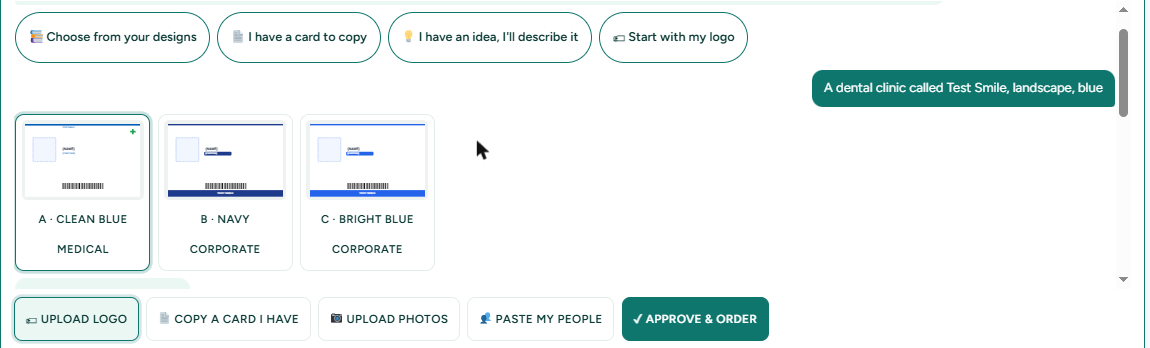
Step 2: Add your school logo and colours
Upload your logo once and it appears on every card. Use your school colours for the header band, and use a different colour or a role label (Staff, Governor, Visitor, Pupil) so roles are clear at a glance. No logo file? The assistant can make a simple monogram from the school’s initials.
Step 3: Add the people
For a whole school, use the CSV template: download it, fill in one row per person, and upload it. Typical fields are name, role or year group, and an ID number. For a few people, type them in or paste them from a spreadsheet. Add each person’s photo with the photo button on their row.
Step 4: Keep the data to what you need
Cards for children should hold as little as possible: a name, a photo if you need one, and a year group or ID number. Leave off home addresses, phone numbers and anything private. Before you collect pupils’ photos, check your school’s data protection policy and your data protection lead. In our designer the photos you add to cards are not sent to the AI assistant. Unfinished orders are deleted after 7 days and finished ones after 180 days.
Step 5: Check and order
Scroll through every card, front and back, and fix any spelling. Download a free PDF to share with your office if you need sign-off. Then tick the box to confirm you are allowed to use these names and photos, and order. Add lanyards and card holders in the same order.
What it costs
Cards start from £4.99. A reverse side adds £1.00 per card, NFC encoding adds £2.50 per card, and QR codes are free. For example, 50 single-sided staff cards come to £249.50, and 50 double-sided cards to £299.50. Delivery is free over £30.
Related: what to include on a staff ID card, ordering for a whole team, ID card maker overview.
Frequently asked questions
Can I make school ID cards online?
Yes. In the NS Design card designer you pick a design or let the AI assistant lay one out, add your logo, add your staff or pupils by typing, pasting or CSV, add photos, and order printed cards. There is no minimum order.
How do I add a whole school at once?
Download the CSV template from the designer, fill in one row per person, and upload it. Then add each person's photo with the photo button on their row.
How much do school ID cards cost?
Cards start from £4.99 each. A reverse side adds £1.00, NFC encoding adds £2.50 and QR codes are free. For example, 50 single-sided cards cost £249.50.
What should be on a pupil's ID card?
As little as possible: a name, a photo if you need one, and a year group or ID number. Leave off home addresses and phone numbers, and check your school's data protection policy before collecting photos.
Are the photos sent to the AI assistant?
No. The photos you add to people's cards are not sent to the AI assistant. What you type and the logo or card pictures you send to the assistant are processed by Anthropic to make suggestions.
Can I add lanyards for staff and visitors?
Yes. After you finish your cards you can add lanyards and card holders to the same order.